 how-to
How to Prevent False Alarms: 7 Essential Steps
Table of Contents
- Why False Alarms Happen and What's at Stake
- Security System Sensor Maintenance: The Foundation
- Proper Sensor Placement and Installation
- Pet-Immune Motion Detector Settings for Your Home
- How to Test Security Sensors Regularly
- False Alarm Fines and Ordinances: What You Need to Know
- Smart Home Integration and System Conflicts
- User Training and System Disarming Best Practices
- Frequently Asked Questions
Last Updated: October 7, 2026
Why False Alarms Happen and What's at Stake
False alarms cost homeowners and businesses far more than most people realize. At Cyrus Alarm Services, we've seen how to prevent false alarms become the difference between a system that protects and one that frustrates.
False alarms stem from a few core causes. Dust accumulation on sensors blocks detection. Improper sensor placement catches environmental triggers like HVAC vents or direct sunlight. Pet movement confuses motion detectors. Battery voltage drops cause false signals. User error during disarming creates trouble alerts. Smart home conflicts trigger unintended automations.
The stakes are real. Many jurisdictions impose false alarm fines ranging from $50 to $300 per incident. After repeated false dispatches, police may stop responding to your address entirely. Your monitoring station's queue logic gets strained. You lose the security you paid for.
Here's what separates homes that stay protected from those that don't: intentional maintenance and proper setup. The seven steps ahead address every major cause of false triggers.
Security System Sensor Maintenance: The Foundation
Sensor maintenance is where prevention starts. Dirty sensors misfire. Dead batteries fail. Corroded contacts break connections. You can't prevent false alarms without keeping your hardware clean and powered.
Cleaning and dust removal
Dust is the silent killer of sensor accuracy. It accumulates on lens surfaces and blocks infrared detection. A PIR sensor covered in cobwebs won't read motion correctly. Glass break sensors with dust buildup miss actual breaks.
Clean your sensors monthly using a soft, dry cloth. Never use liquid cleaners on the sensor lens. For hard-to-reach areas, use a dry brush or compressed air. Check around window frames and door sensors where dust settles fastest.
Pay special attention to areas near HVAC vents. These spots collect dust fastest because air movement carries particles directly to your sensors. If a motion detector sits above a heating vent, dust accumulation accelerates.
Battery health and voltage checks
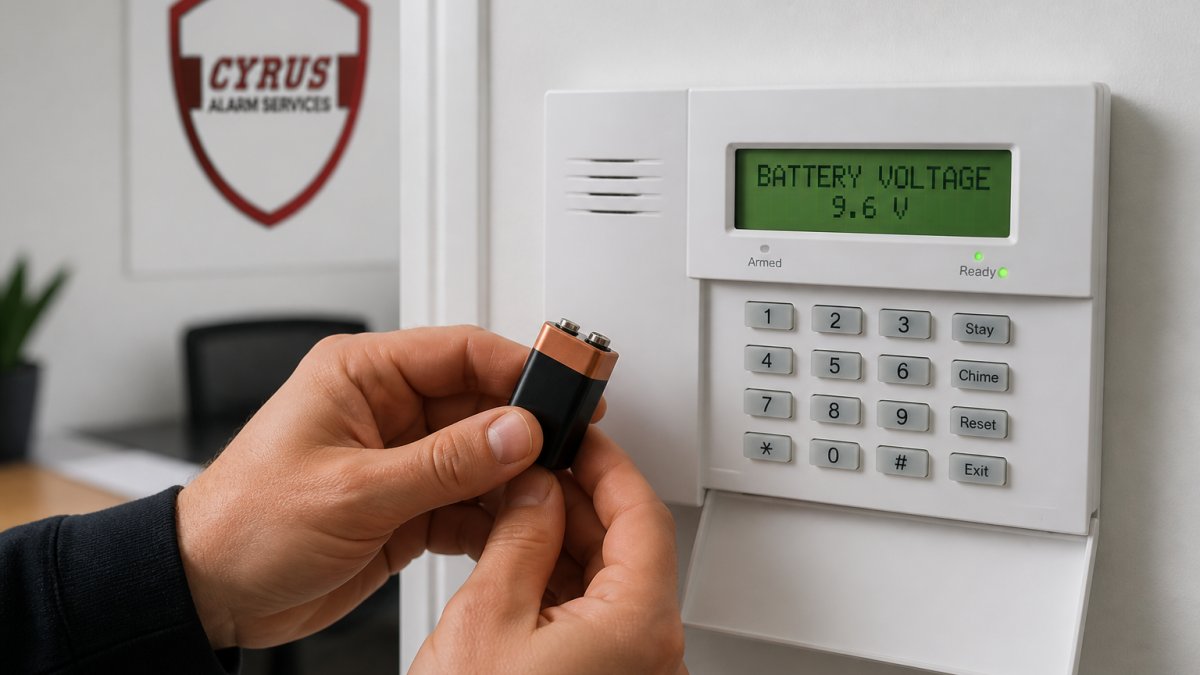
Battery voltage drops cause false trouble signals and failed detection. Most modern alarm panels show battery status on the display. Check it monthly. Voltage should stay above 3.0 volts for most sensors.
Replace batteries annually, even if the panel shows green status. Old batteries leak. Leaked battery acid corrodes the contact points inside sensors. This creates intermittent faults that trigger false alarms.
Keep spare batteries on hand. When you replace one, note the date on the sensor housing. Stagger replacements across your system so you're not replacing everything at once during an emergency.
Temperature affects battery performance. Cold weather drains voltage faster. If you live in a climate with cold winters, check battery status more frequently during those months.
Proper Sensor Placement and Installation
Where you place a sensor determines whether it works or triggers false alarms. A motion detector aimed at a sunny window will fire constantly. A door sensor mounted loose will rattle and create trouble signals.
Avoiding environmental triggers
Environmental factors cause more false alarms than any other source. Direct sunlight through windows heats motion detector lenses and causes false triggers. HVAC drafts push curtains and trigger sensors. Temperature swings create condensation inside sensor housings.
Mount motion detectors on interior walls, never facing windows. Position them 5 to 6 feet high, angled downward slightly. This height captures human movement but avoids pet-level motion and ceiling drafts.
Keep sensors away from heat sources. Radiators, fireplaces, and heating vents create temperature fluctuations that fool infrared sensors. If your home has forced-air heating, never mount a motion detector directly above or below a vent.
Avoid mounting sensors near curtains or blinds. Wind or manual movement of fabric can trigger false alarms. The same applies to hanging plants or decorations that move with air currents.
Check your security zone layout. Each zone should cover a specific entry point or room. Overlapping zones cause redundant triggers. Clear zones reduce false dispatches to your monitoring station.
Glass break and dual-technology sensors
Glass break sensors detect the acoustic signature of breaking glass. They're sensitive instruments. Loud noises like slamming doors or dropped objects can trigger them if they're too sensitive.
Dual-technology motion detectors combine PIR and microwave sensing. Both must trigger within a short time window for the sensor to alarm. This dual-layer approach cuts false alarms significantly because environmental factors rarely trigger both sensors simultaneously.
Mount glass break sensors on the interior wall nearest your protected windows, not on the window frame itself. Position them within 10 feet of the glass they protect. Too far away, and they miss actual breaks. Too close to other noise sources, and they trigger on false events.
Test your glass break sensors quarterly by tapping the protected window gently. The sensor should not alarm. Only actual breaking glass should trigger the system.
Pet-Immune Motion Detector Settings for Your Home
Pets cause more false alarms than any other household factor. A cat jumping on furniture triggers standard motion detectors. A dog running through a room sets off alarms in the middle of the night.
Pet-immune motion detectors use advanced PIR technology to ignore motion below a certain height and mass. Most pets move at floor level. Humans move higher and with more mass. The sensor learns the difference.
Adjust your motion detector sensitivity settings based on your pet's size. Systems with adjustable sensitivity allow you to dial in the right level. Too sensitive, and your pets still trigger alarms.
If you have multiple pets, test your system after adjusting settings. Walk through each room normally. Have someone move around at different heights and speeds.
Place motion detectors where pets can't reach them. Mount them high on walls. Avoid placement on furniture or shelves where a cat or dog could jump nearby and trigger the sensor.
How to Test Security Sensors Regularly
Regular testing catches problems before they become false alarms. A sensor that works today might fail tomorrow. Testing reveals battery issues, connection problems, and sensitivity drift.
System testing protocols and verification layers
Test each sensor individually once a month. Open each door and window sensor to verify it triggers. Walk through each motion detector zone to confirm it detects movement.
Use your system's test mode if available. Test mode sends signals to your panel without alerting your monitoring station. This lets you verify functionality without causing a false dispatch.
Document your test results. Note the date, which sensors you tested, and whether each responded correctly. This record helps you spot patterns. If one sensor fails repeatedly, it may need replacement.
Your monitoring station uses verification layers to reduce false alarms. When a sensor triggers, the panel may request confirmation before dispatching police. Some systems use two-way voice communication.
Understand your system's verification protocol. Know whether your alarm requires verbal confirmation, a secondary sensor trigger, or both.
Firmware updates improve sensor accuracy and reduce false triggers. Check your alarm panel's software version quarterly. Contact your installer or monitoring service to learn if updates are available.
False Alarm Fines and Ordinances: What You Need to Know
False alarm ordinances vary by jurisdiction, but most municipalities impose escalating penalties. Understanding your local rules prevents costly surprises.
Many areas charge fees starting at around $50 for the first false alarm per year, increasing to $200 or more for repeated incidents. Some jurisdictions cap the number of free responses before fines apply. Others impose fines immediately.
Check your city or county website for local false alarm ordinances. Some areas require alarm system permits. Permits often cost a small fee and may waive the first false alarm annually. Registration also helps police distinguish legitimate systems from unmonitored ones.
Repeated false alarms can result in police refusing to respond to your address. After five or more false dispatches in a year, some departments de-prioritize calls from that location. This means real emergencies get slower response times.
Document your compliance efforts. Keep records of sensor maintenance, testing, and firmware updates. If you receive a false alarm citation, this documentation shows you took reasonable steps to prevent false triggers.
Smart Home Integration and System Conflicts
Smart home automation adds convenience but introduces new sources of false alarms. Automated routines can trigger sensors unintentionally. Voice assistants can accidentally disarm systems.
Smart locks that unlock automatically when you approach can trigger door sensors if the sensor interprets the unlock signal as forced entry. Motion-activated lights can confuse motion detectors during automation sequences.
Test your smart home automations with your security system in test mode first. Verify that automated routines don't trigger false alarms before activating them in armed mode.
Separate your smart home network from your security system network when possible. This isolation prevents automation routines from interfering with alarm signals.
Ensure only authorized users can disarm your system. Smart home voice commands should require a verbal PIN or secondary confirmation to disarm the alarm.
Review your smart home automation rules monthly. Disable automations that conflict with your security system. The convenience of automation isn't worth the false alarms and monitoring station fees it creates.
User Training and System Disarming Best Practices
User error causes a significant portion of false alarms. People forget disarm codes. They don't understand how to properly exit the system during the entry delay.
Train every household member on proper system operation. Show them how to disarm the system before opening doors during the entry delay. Explain the difference between armed and disarmed states.
Create a simple checklist for arming your system:
- All doors and windows are closed
- All motion detectors have a clear zone
- All authorized users are accounted for
- The disarm code is ready before opening any entry point
Post this checklist near your alarm keypad. New household members should review it before arming the system.
Establish a protocol for guests and service providers. Give them temporary disarm codes that expire after one visit.
If someone forgets their disarm code, they have a limited time window to enter it before the alarm triggers. Most systems allow 30 to 60 seconds.
False alarms drain your security budget and erode police response reliability. Regular maintenance, proper placement, smart home discipline, and user training transform your system from a false alarm liability into genuine protection.
At Cyrus Alarm Services, we test every device in your home before installation to ensure it's positioned correctly and functioning reliably.
| Prevention Step | Primary Benefit | Frequency |
|---|---|---|
| Clean sensors and check battery voltage | Eliminates dust-related false triggers and power failures | Monthly |
| Mount sensors away from HVAC vents and sunlight | Prevents environmental triggers | One-time during installation |
| Adjust pet-immune motion detector sensitivity | Stops pet-triggered false alarms | After setup, then quarterly |
| Test each sensor individually | Catches problems before false dispatch | Monthly |
| Review smart home automation rules | Prevents automation conflicts with security | Monthly |
| Train users on proper disarming | Reduces user error false alarms | When new users added |
| Check local false alarm ordinances | Avoids fines and police de-prioritization | Annually |
Frequently Asked Questions
What is the most common cause of false alarms in home security systems?
User error and improper sensor placement are the leading causes. Motion detectors positioned near heating vents, air conditioning outlets, or windows with direct sunlight trigger false alarms frequently. Cobwebs on sensors, low battery voltage, and pets moving near motion detectors also generate false triggers. Proper placement away from environmental factors and regular maintenance eliminate most preventable false alarms.
Do false alarms result in fines from local authorities?
Yes. Many municipalities enforce false alarm ordinances that impose fines for excessive false dispatches. Fines typically range from $50 to several hundred dollars per false alarm after a threshold is reached (often 3-5 false alarms per year). Some jurisdictions may also charge response fees or deny future police dispatch if false alarms continue. Understanding your local ordinance and preventing false alarms protects you from these costs.
How often should security sensors be tested to prevent errors?
Test your system monthly using your alarm panel's test function or by contacting your monitoring station. Walk through each zone to verify motion detectors respond correctly, check door and window sensors for proper operation, and test glass break sensors. Monthly testing catches battery issues, sensor drift, and placement problems before they cause false alarms during normal operation.
How can I reduce false alarms if I have pets at home?
Use pet-immune motion detectors that ignore movement below a certain height (typically up to 40-50 pounds). Adjust sensitivity settings on your motion detector to account for your pet's size and movement patterns. Position pet-immune sensors away from pet pathways and ensure they're mounted at the correct height. Test the system with your pets moving normally to verify the detector distinguishes between pet movement and human intrusion.